

DP2-TWAIN for Windows OS V10.3 Installer | DP2-TWAIN for Windows OS V10.3 InstallerGeneralThis software is the installer of DP2-TWAIN Ver.10.3.
This software will also update earlier DP2-TWAIN versions to Ver.10.3, that are already installed on the system.
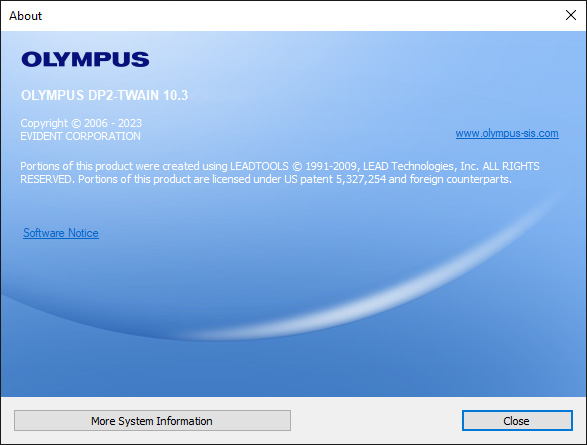
The currently installed version is shown.
Main additions / changes of DP2-TWAIN V10.3
Installation procedureBefore installation
System Requirements
Operating System:
CPU:
Memory:
Display monitor:
Interface:
Download
Software installation1) Double-Click the [setup] file in decompressed folder [DP2TWAIN V10.3].
2) Select [Yes] when the [User Account Control] dialog box is displayed.
3) The Setup program of this software will start.
4) [License Agreement] will appear. Read the "EVIDENT END-USER LICENSE AGREEMENT". If you agree, select [Yes] and click the [Next] button.
5) [Language settings] will appear. Choose a language provided by drop-down menu and click the [Next] button.
6) [Customer Information] will appear. Enter the user's information and click the [Next] button.
7) Select the camera(s) you want to use.
8) [Choose Destination Location] will appear. If you need to change the location for DP2-TWAIN installation, click the [Browse...] button and select the desired folder. Click the [Next] button.
9) [Select Additional Tasks] will appear. Un-check Add manuals shortcut to the desktop if a shortcut is not required. Click the [Next] button to start installation.
10) [Start Copying Files] will appear Click the [Next] button to start installation.
11) The Setup program of this software will start.
12) When installation is successful, click the [Next] button
13) [Connect Devices] will appear. In case you wish to install a FireWire device, pleas connect it to the computer, power it on, and carry on by clicking the [Start Configuration] icon. Else wise you can click on [Cancel]. The [Setup] window will close, the installation is completed.
14) Please restart the PC before using the software for the first time.
|
|
![To check your current version of DP2-TWAIN, start DP2-TWAIN and Click on [Help] in the menu bar and choose [About]](https://lifescience.evidentscientific.com.cn/data/Image/SoftwareDownload/DP_Series/sf_dp2twain_winos-v103_01.jpg?rev=16D6)
![1) Double-Click the [setup] file in decompressed folder [DP2TWAIN V10.3].](https://lifescience.evidentscientific.com.cn/data/Image/SoftwareDownload/DP_Series/sf_dp2twain_winos-v103_03.jpg?rev=16D6)
![2) Select [Yes] when the [User Account Control] dialog box is displayed.](https://lifescience.evidentscientific.com.cn/data/Image/SoftwareDownload/DP_Series/sf_dp2twain_winos-v103_04.jpg?rev=16D6)

![4) [License Agreement] will appear. Read the EVIDENT END-USER LICENSE AGREEMENT. If you agree, select [Yes] and click the [Next] button.](https://lifescience.evidentscientific.com.cn/modules/imageresizer/bed/03c/1fffb34b60/500x381p250x191.jpg)
![5) [Language settings] will appear. Choose a language provided by drop-down menu and click the [Next] button.](https://lifescience.evidentscientific.com.cn/data/Image/SoftwareDownload/DP_Series/sf_dp2twain_winos-v103_07.jpg?rev=16D6)
![6) [Customer Information] will appear. Enter the user's information and click the [Next] button.](https://lifescience.evidentscientific.com.cn/data/Image/SoftwareDownload/DP_Series/sf_dp2twain_winos-v103_08.jpg?rev=16D6)

![8) [Choose Destination Location] will appear. If you need to change the location for DP2-TWAIN installation, click the [Browse...] button and select the desired folder. Click the [Next] button.](https://lifescience.evidentscientific.com.cn/data/Image/SoftwareDownload/DP_Series/sf_dp2twain_winos-v103_10.jpg?rev=16D6)
![9) [Select Additional Tasks] will appear. Un-check Add manuals shortcut to the desktop if a shortcut is not required. Click the [Next] button to start installation.](https://lifescience.evidentscientific.com.cn/data/Image/SoftwareDownload/DP_Series/sf_dp2twain_winos-v103_11.jpg?rev=16D6)
![10) [Start Copying Files] will appear Click the [Next] button to start installation.](https://lifescience.evidentscientific.com.cn/data/Image/SoftwareDownload/DP_Series/sf_dp2twain_winos-v103_12.jpg?rev=16D6)

![12) When installation is successful, click the [Next] button](https://lifescience.evidentscientific.com.cn/data/Image/SoftwareDownload/DP_Series/sf_dp2twain_winos-v103_14.jpg?rev=16D6)
![13) [Connect Devices] will appear. In case you wish to install a FireWire device, pleas connect it to the computer, power it on, and carry on by clicking the [Start Configuration] icon. Else wise you can click on [Cancel]. The [Setup] window will close, the installation is completed.](https://lifescience.evidentscientific.com.cn/data/Image/SoftwareDownload/DP_Series/sf_dp2twain_winos-v103_15.jpg?rev=16D6)

Sorry, this page is not
available in your country.