Confocal laser scanning microscopes have become indispensable tools in life sciences and medical research, enabling high-resolution observation and three-dimensional analysis of biological specimens such as cells and tissues. They are widely used in fields including cell biology, neuroscience, and developmental biology, serving as a foundational technology that supports research quality and reproducibility.
To meet diverse research needs, confocal microscopes have evolved to offer increasingly advanced features and greater flexibility in imaging conditions. However, this progress has also led to more complex software interfaces, creating significant challenges—especially for novice users—such as time-consuming setup, a higher risk of operational errors, and reduced efficiency in research workflows.

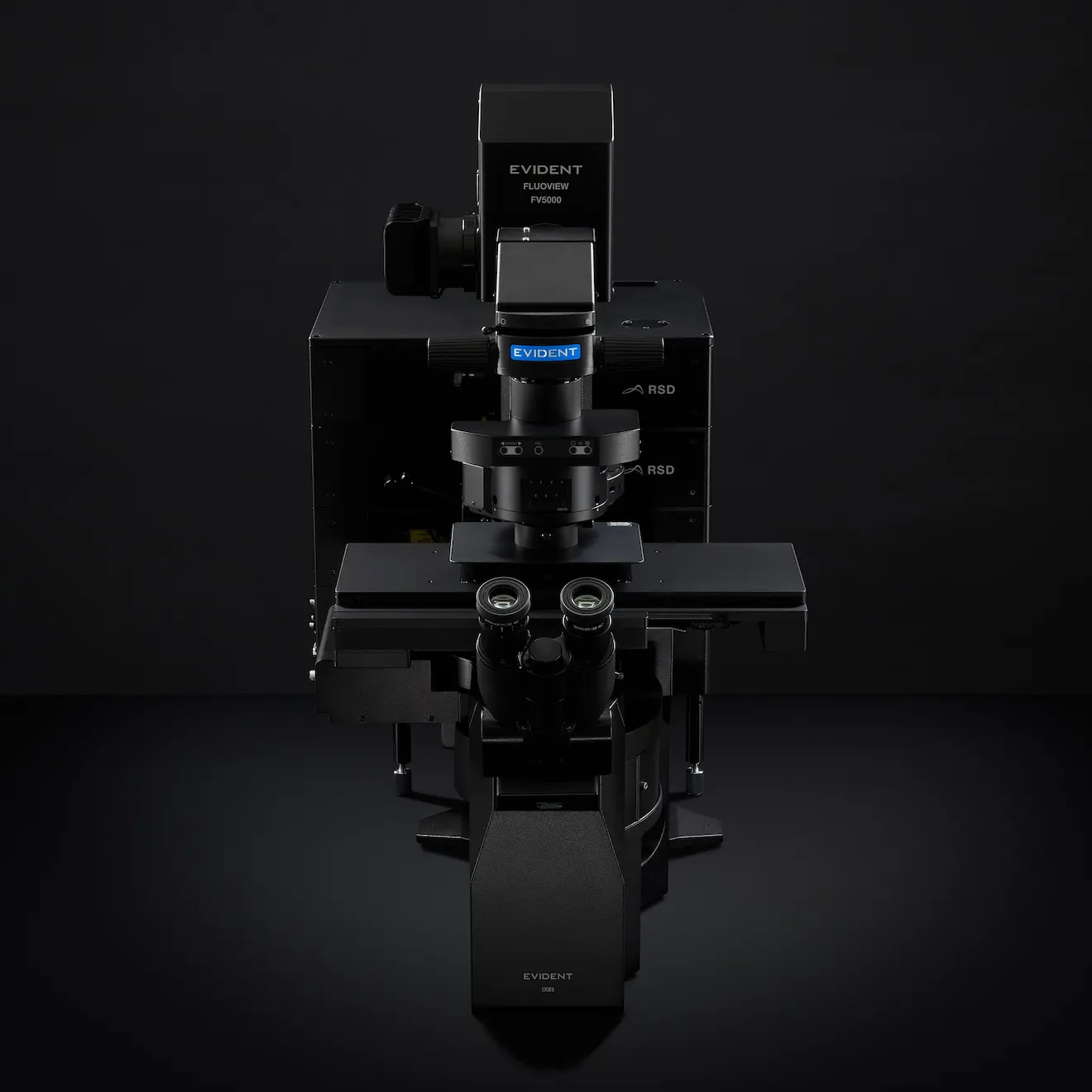
Evident’s FLUOVIEW Smart confocal software is designed to help users of all skill levels operate the FLUOVIEW™ FV5000 laser scanning microscope both confidently and efficiently. It employs three key approaches to reduce operational burden and enhance research productivity and reproducibility.
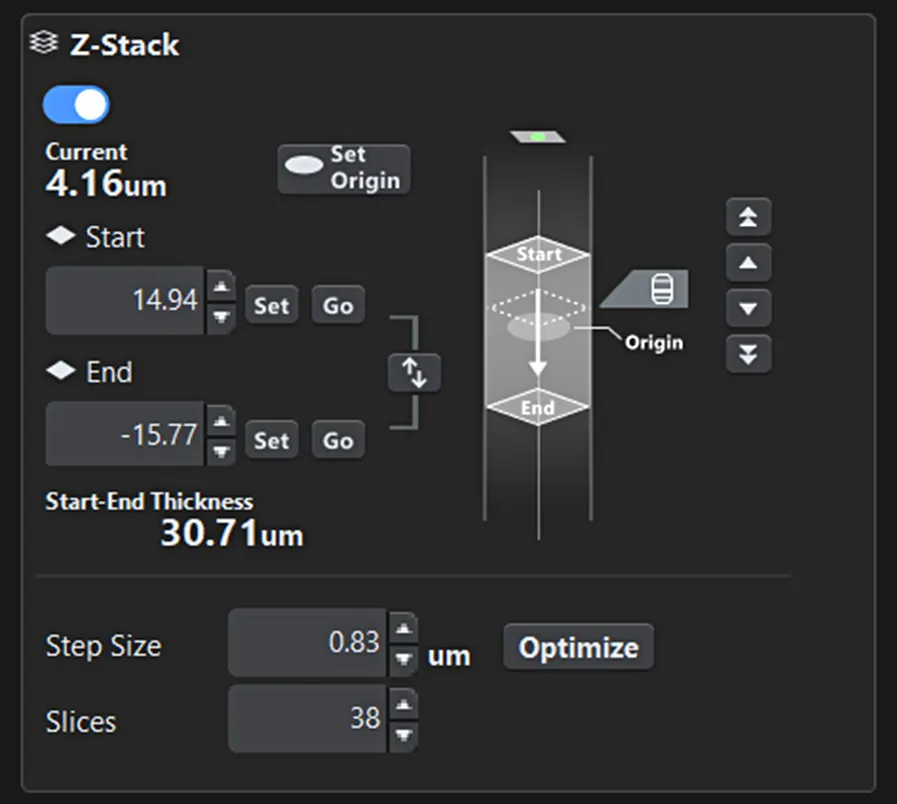
Basic microscope operations—such as Z-range settings and objective lens selection—are not merely configurations but essential information for understanding the current system state. FLUOVIEW Smart visualizes these settings graphically, allowing users to intuitively grasp their meaning and impact (Figures 1 and 2).

Figure 1. Z-range setting screen. The start and end positions for imaging, as well as the current observation position, are clearly visible at a glance.
Onscreen guides further assist users in performing tasks without confusion, reducing the need for constant supervision and enabling autonomous data acquisition.
Instead of cramming all functions into a single screen, FLUOVIEW Smart™ software organizes them hierarchically by frequency and importance. Critical controls—such as laser power, scan range, and Z-stack settings—are always easily accessible, aligning with the natural workflow (sample detection → condition setup → imaging). This design minimizes search time and significantly reduces the risk of errors.

Figure 2. Objective lens selection screen. Users can intuitively select the desired objective lens, and the currently active lens is easily identifiable.
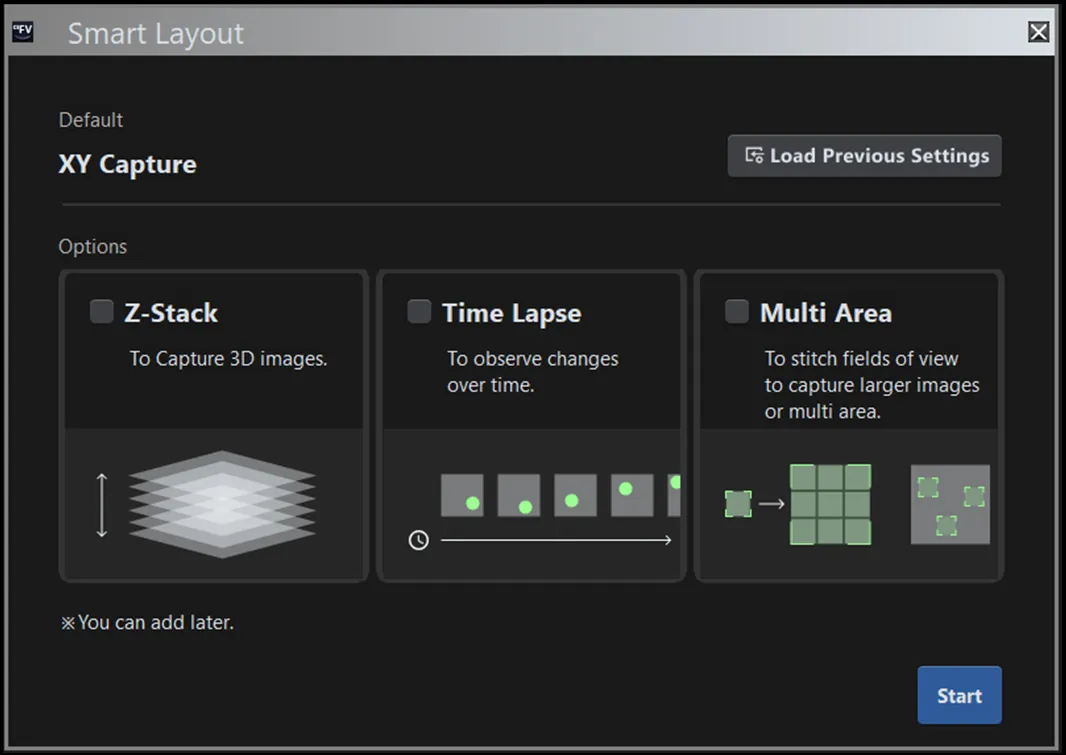
To prevent issues in shared environments, FLUOVIEW Smart software resets settings to default at startup. At the same time, it allows users to save and recall previous configurations for reproducibility. Additionally, selecting an imaging purpose (e.g., Z-stack, time-lapse, multiarea stitching) automatically adjusts the layout and guidance, providing an optimal interface for both beginners and experts (Figure 3).

Figure 3. Purpose selection screen. The layout and onscreen guidance automatically adjust based on the selected objective.
Beyond simplifying the interface, FLUOVIEW Smart™ software leverages AI to automate and optimize steps that are particularly challenging for beginners.
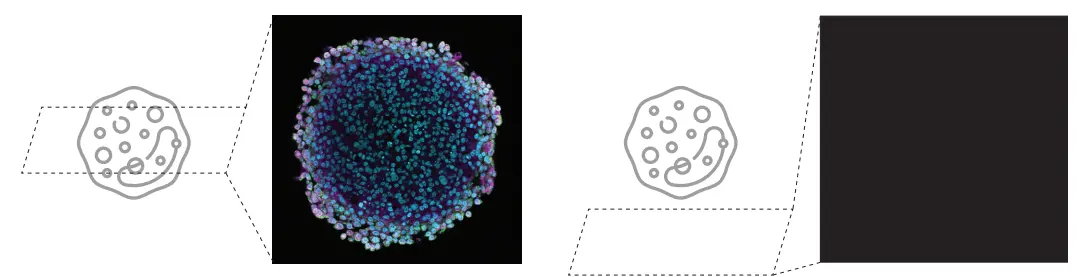
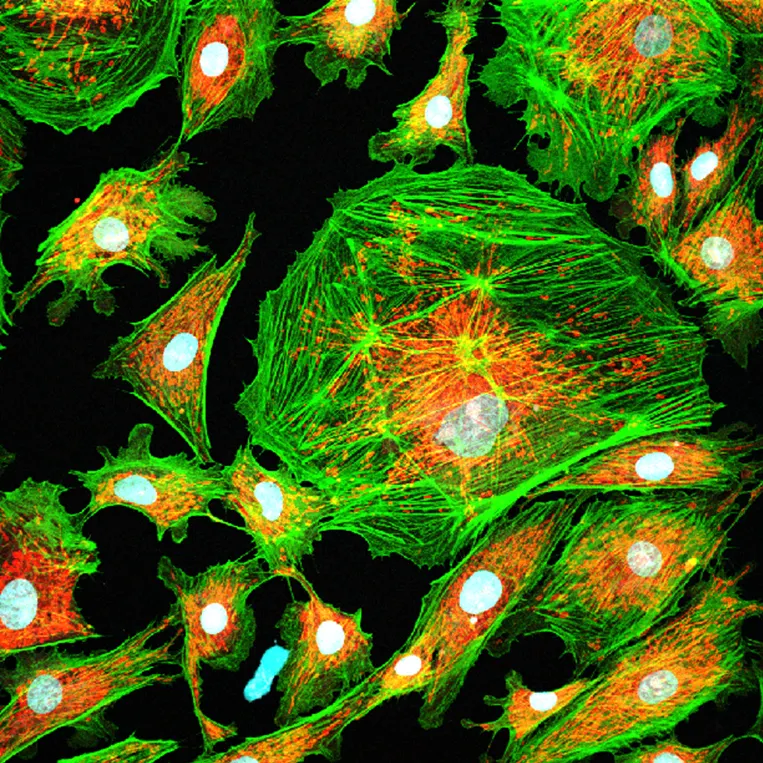
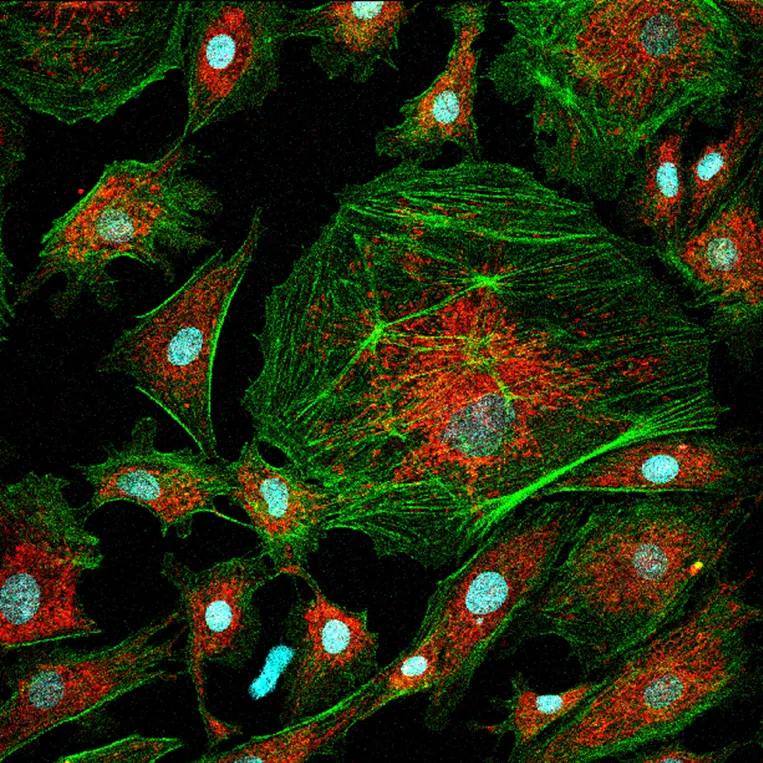
Due to the optical principles of confocal microscopy, if the sample is out of focus in either XY or Z, the screen may appear blank—leaving novice users uncertain whether the issue is due to settings or hardware malfunction.
To address this challenge, Evident and Epistra—leveraging their proven expertise in AI development for life sciences—jointly developed an image recognition algorithm that automatically switches the microscope to an optimal state for sample searching and identifies the sample region. This significantly simplifies and accelerates a process that was previously difficult for beginners (Figure 4).

Figure 4. The high difficulty of sample searching in confocal laser scanning microscopy can lead to a blank screen (right image)
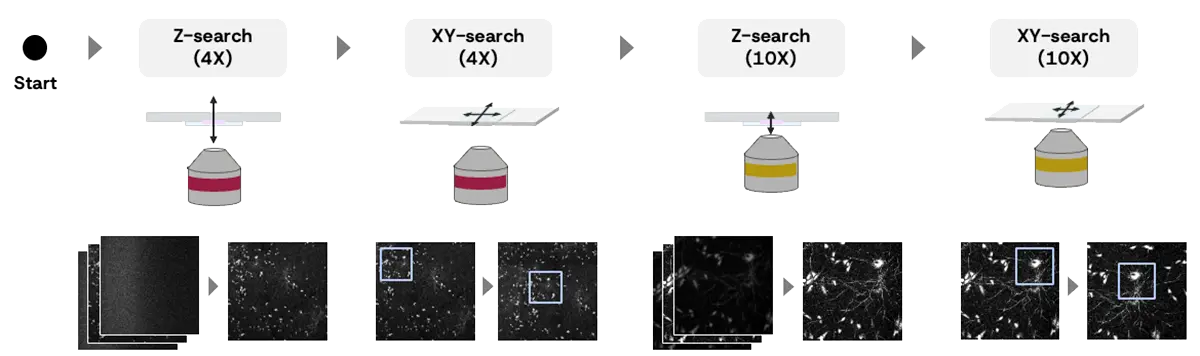
Figure 5 illustrates the overall workflow for sample position estimation.
The system is designed to mimic the expert user’s approach: performing coarse alignment of the Z and XY axes using a low-magnification objective lens (4X), followed by fine adjustments with a high-magnification lens (10X).
Specifically, the system executes the following four steps in sequence to automatically determine the optimal sample position.
Z-SEARCH (4X)
This step performs a sequential search* using a 4X objective lens to roughly identify the optimal Z-position within the search range. At each candidate Z-position, an image is captured, and the AI evaluates its focus score. Based on these results, the system autonomously updates the next Z-position to explore, iterating until the position with the highest focus score is reached. The Z-search range is appropriately set according to the user’s selection in the wizard.
XY-SEARCH (4X)
Using the image acquired with the 4X objective lens, the XY stage is moved so that the region with the highest local brightness is centered on the screen. Before this process, the system detects predefined artifacts (e.g., container edges). If artifacts are detected, an alert is displayed, and the process stops. The user can then manually adjust the sample’s XY-position as needed.
Z-SEARCH (10X)
After switching to a 10X objective lens, the system performs a sequential search to determine the optimal Z-position within the range. The Z-search range is determined based on the optimal Z-position found at 4X and the Z-resolution of the 4X lens.
XY-SEARCH (10X)
In the 10X image, the XY stage is moved so that the region with the highest local brightness is centered on the screen. After this process, the system displays the current microscope image to the user, completing the search procedure.

Figure 5. The Overall workflow for sample position estimation:
Z-SEARCH (4X)
XY-SEARCH (4X)
XY-SEARCH (4X)
Z-SEARCH (10X)
XY-SEARCH (10X)
*Sequential search: a method that explores the sample position by capturing images sequentially across a defined search range.
In conventional confocal laser scanning microscopy, there is an inherent tradeoff between detector sensitivity and laser power, requiring trial and error to find the optimal settings. Beginners often face the dilemma that increasing sensitivity introduces more noise, while increasing laser power risks damaging the sample (Figure 6). As a result, determining the appropriate imaging conditions can be time-consuming. Evident addresses this challenge with its proprietary nextgeneration SilVIR™ detector technology, which eliminates the need to adjust detector sensitivity. This reduces the number of parameters users must configure, resulting in simpler operation. Consequently, setting the laser power to achieve the appropriate contrast becomes the most critical factor influencing image quality.
FLUOVIEW Smart™ software automatically determines the optimal laser power based on real-time image analysis and machine learning predictions. Users can easily apply settings tailored to their needs by selecting a mode according to the priority between minimizing sample damage and maximizing contrast.
TOO HIGH LASER POWERLaser power that is too high leads to high phototoxicity
Figure 6. Tradeoff between laser power and image quality. | TOO LOW LASER POWERLaser power that is too low leads to noisy images
|
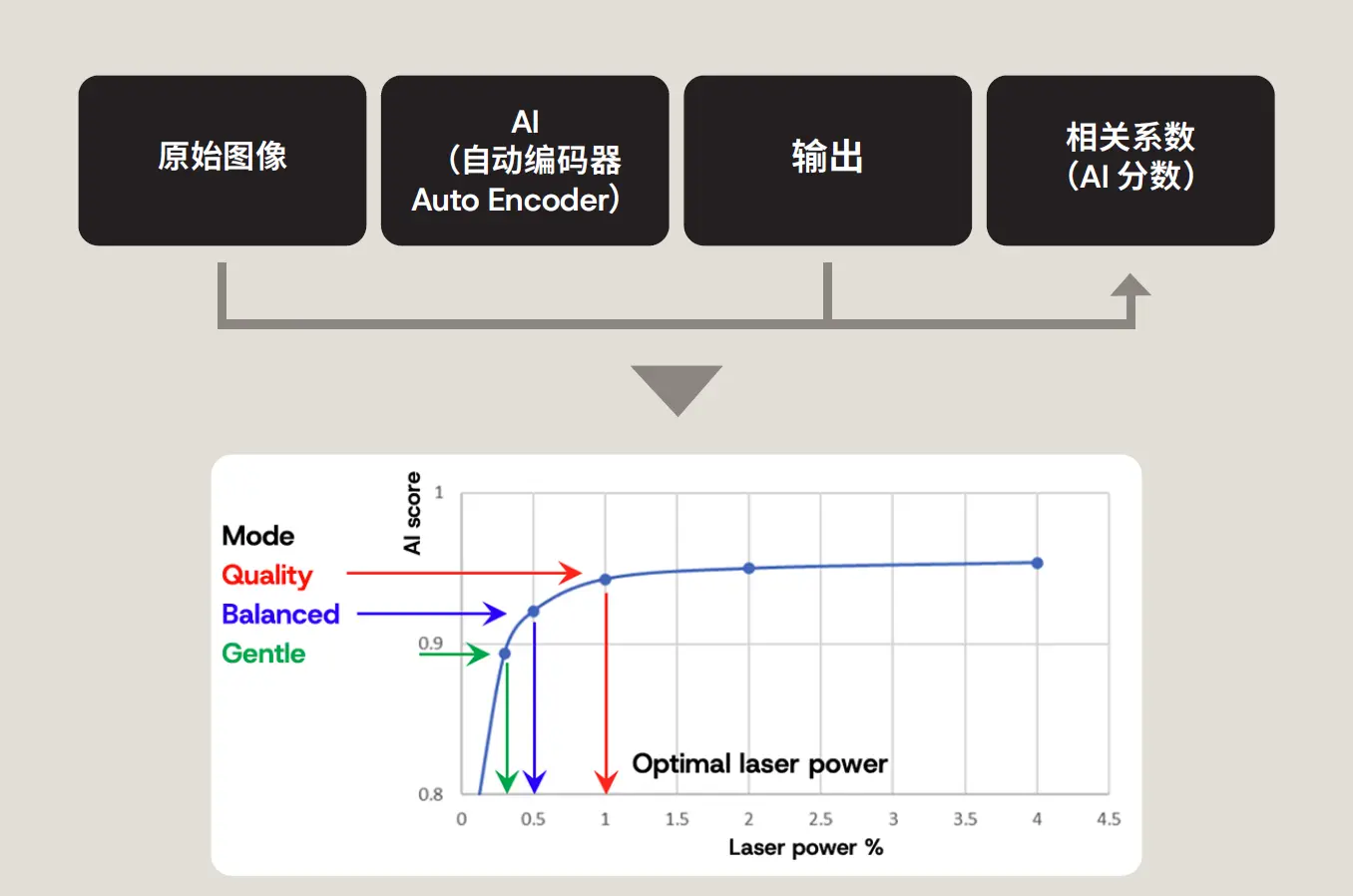
The overall process is as follows:
The user selects one of three modes—Gentle, Balanced, or Quality—based on the priority between sample protection and image contrast.
When the user clicks the execution button, the system automatically sets the optimal laser power and completes the process. During execution, the following steps occur internally:

Figure 7. Concept behind laser power estimation with the following steps: 1: Predict clean, low-noise images from the raw image by using AI. 2: Compare the predicted image with the original raw image. 3. Calculate a correlation coefficient (AI score: high score is stable with low noise, low score is unstable with high noise). 4. Estimate the optimal laser power based on the selected mode.
Note: the AI score is similar to the image signal-to-noise ratio (SNR), though slightly different. The score increases with laser power, reflecting improved image quality due to reduced noise. The plateau region of the AI score curve indicates an appropriate laser power setting: in this range, further increases in laser power yield negligible improvements in image quality, making them inefficient.
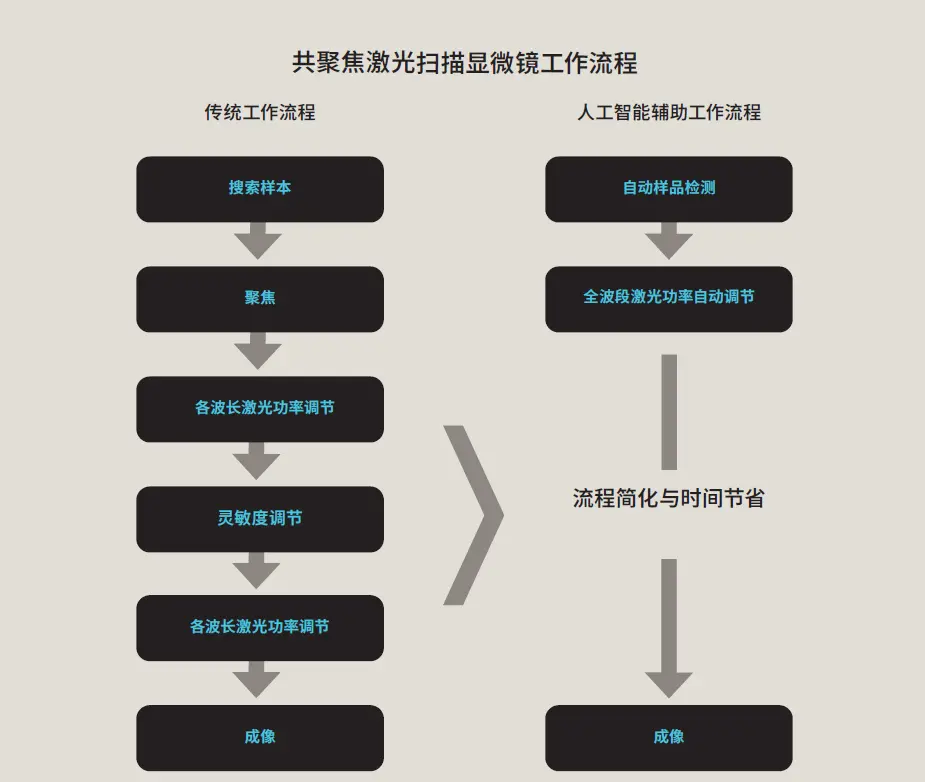
FLUOVIEW Smart™ confocal software simplifies the interface for FLUOVIEW™ FV5000 laser scanning microscopes and enhances workflows through AI technology (Figure 8).
By combining a user experience–focused software interface with AI-driven smart assist features, FLUOVIEW Smart software enables even beginners to acquire high-quality images in a short time, dramatically improving productivity and reproducibility in research environments.

Figure 8. Streamlining confocal microscopy observation with an AI-assisted workflow.
Ryoji Kitamura
Global Product Manager, High-End Imaging Systems, Life Science
Ryoji Kitamura earned his master’s degree from the Graduate School of Information Science and Technology at Hokkaido University, where he focused on in vivo imaging using multiphoton microscopy. He began his career at Evident as a software engineer and later became the product leader for the SLIDEVIEW™ VS200 universal whole slide imaging scanner. He also served as the Global Product Manager for the IXplore™ IX85 inverted microscope system. Currently, he is the Global Product Manager for the FLUOVIEW™ confocal microscope series, leading product strategy, planning, and development.
Please adjust your selection to be no more than 5 items to compare at once
对不起,此内容在您的国家不适用。
您即将被转换到我们的本地网站。